Exploring machine learning models using the Tidy Models package
Following the guidance from https://www.tidymodels.org/start/models/
library(tidymodels)  # for the parsnip package, along with the rest of tidymodels
library(tidyverse)
library(broom.mixed) # for converting Bayesian models to tidy tibbles
library(dotwhisker)  # for visualizing regression results
Reading in the Urchin dataset
urchins <- read_csv("https://tidymodels.org/start/models/urchins.csv")  |>
  setNames(c("food_regime", "initial_volume", "width")) |>
  mutate(food_regime = factor(food_regime, levels = c("Initial", "Low", "High")))
##
## -- Column specification ------------------------------------------------------------------------------------------------
## cols(
## TREAT = col_character(),
## IV = col_double(),
## SUTW = col_double()
## )glimpse(urchins)## Rows: 72
## Columns: 3
## $ food_regime <fct> Initial, Initial, Initial, Initial, Initial, Initial, I~
## $ initial_volume <dbl> 3.5, 5.0, 8.0, 10.0, 13.0, 13.0, 15.0, 15.0, 16.0, 17.0~
## $ width <dbl> 0.010, 0.020, 0.061, 0.051, 0.041, 0.061, 0.041, 0.071,~Getting a visual overview of the dataset
urchins |>
  ggplot(aes(initial_volume, width, colour = food_regime))+
  geom_point()+
  geom_smooth(method = lm, se = FALSE)+
  theme_minimal()
## `geom_smooth()` using formula 'y ~ x'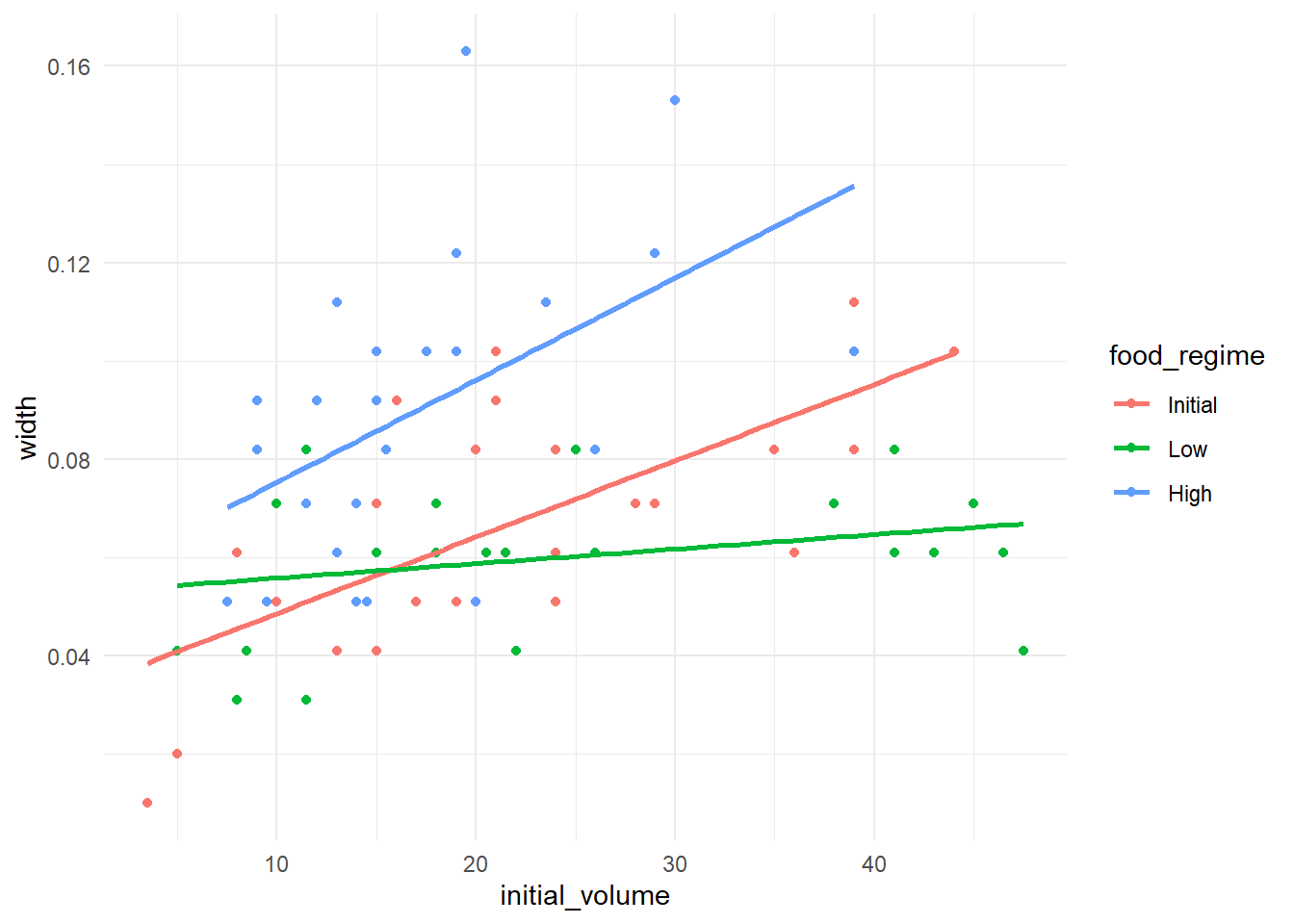
Building a predictive linear model
linear.model <- linear_reg()  |>
  parsnip::set_engine("lm")

linear.fit <- linear.model |>
  parsnip::fit(width ~ initial_volume * food_regime, data = urchins)

linear.fit |>
  tidy()
## # A tibble: 6 x 5
## term estimate std.error statistic p.value
## <chr> <dbl> <dbl> <dbl> <dbl>
## 1 (Intercept) 0.0331 0.00962 3.44 0.00100
## 2 initial_volume 0.00155 0.000398 3.91 0.000222
## 3 food_regimeLow 0.0198 0.0130 1.52 0.133
## 4 food_regimeHigh 0.0214 0.0145 1.47 0.145
## 5 initial_volume:food_regimeLow -0.00126 0.000510 -2.47 0.0162
## 6 initial_volume:food_regimeHigh 0.000525 0.000702 0.748 0.457tidy(linear.fit) |>
ggplot(aes(term, estimate, ymin = estimate - std.error, ymax = estimate + std.error, colour = term)) +
geom_errorbar()+
geom_point()+
coord_flip()+
theme_bw()+
theme(legend.position = "none")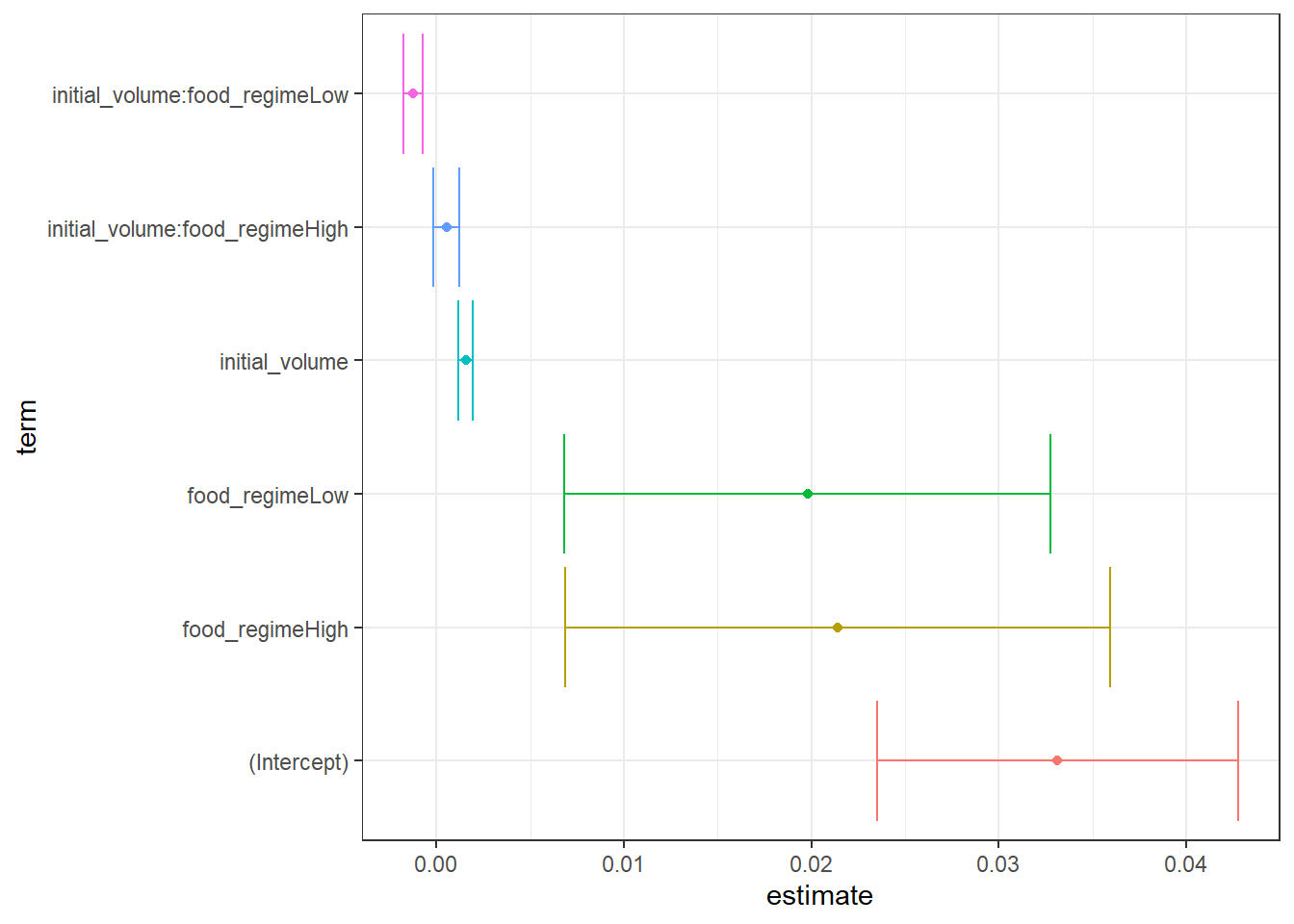
Using the model to make predictions
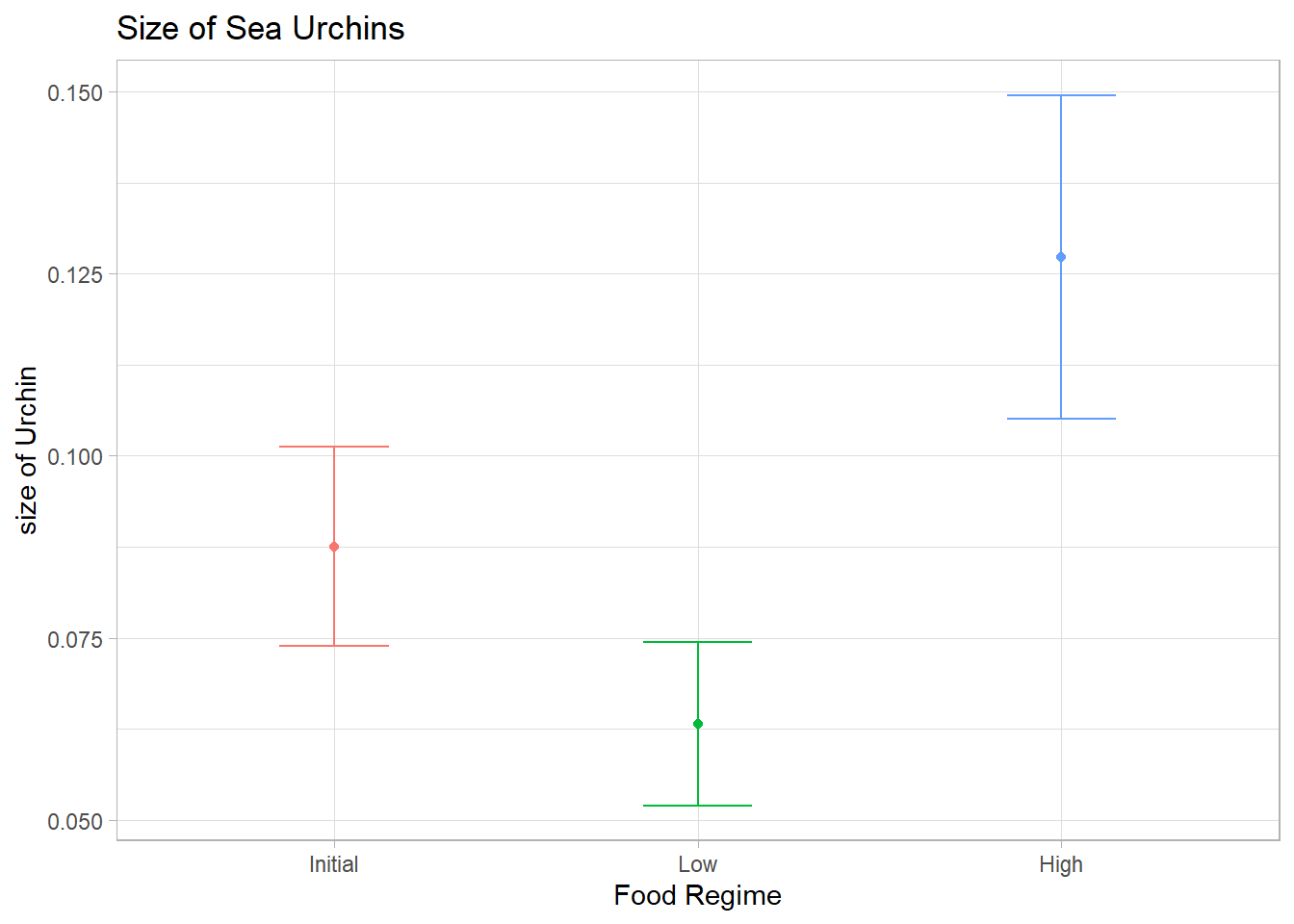
new_data <- expand.grid(initial_volume = 35,
                          food_regime = c("Initial", "Low", "High"))

prediction <- predict(linear.fit, new_data = new_data)
prediction
## # A tibble: 3 x 1
## .pred
## <dbl>
## 1 0.0875
## 2 0.0632
## 3 0.127prediction_conf <- predict(linear.fit,
new_data = new_data,
type = "conf_int")
prediction_conf## # A tibble: 3 x 2
## .pred_lower .pred_upper
## <dbl> <dbl>
## 1 0.0738 0.101
## 2 0.0520 0.0745
## 3 0.105 0.150plotting <- new_data |>
bind_cols(prediction) |>
bind_cols(prediction_conf)
plotting## initial_volume food_regime .pred .pred_lower .pred_upper
## 1 35 Initial 0.08753404 0.07383931 0.10122876
## 2 35 Low 0.06323846 0.05202294 0.07445398
## 3 35 High 0.12733395 0.10514313 0.14952477plotting |>
ggplot(aes(x = food_regime, y = .pred, colour = food_regime))+
geom_point()+
geom_errorbar(aes(ymin = .pred_lower, ymax = .pred_upper), width = 0.3)+
theme_light()+
theme(legend.position = 'none')+
labs(title = "Size of Sea Urchins",
y = "size of Urchin",
x = "Food Regime")